A local-first workspace that turns a hiring brief into a reviewable candidate shortlist. Recruiters search an imported profile collection, examine source-linked evidence, and keep criteria, approvals, spending, and decisions attached to the work behind them.
From hiring brief to candidate shortlist: inside Talent Hub
From Hiring Brief to Candidate Shortlist: Inside Talent Hub
Recruiting often begins with a deceptively difficult question: “Who in this collection of people could be right for this role?”
Answering it requires more than matching job titles. Two people can hold the same title while doing very different work. Relevant experience may appear several jobs back. A profile might describe an employer’s products without explaining the person’s responsibilities. Missing information can make a promising candidate difficult to judge.
Talent Hub brings that work into a shared workspace. A recruiter describes the hiring need, searches an imported collection of profiles, examines supporting evidence, and builds a shortlist. AI helps interpret requests, explore search approaches, and assess experience. The application keeps track of the sources, criteria, approvals, spending, and decisions behind that work.
Its central design choice is to treat finding someone, assessing them, and shortlisting them as distinct activities. Each produces different information, and the Hub preserves those differences throughout the workflow.
A hiring brief gives the work its structure
A Project holds an imported candidate collection and related hiring work. Profiles arrive through a supplied data export. The Hub organizes that information into records it can search and review.
Within the Project, a reusable Role Configuration describes the hiring requirements. It can contain mandatory criteria, preferences, exclusions, and guidance about useful evidence. A Hiring brief carries those requirements into a particular Search, where the recruiter can refine them as their understanding develops.
Consider a hypothetical search for an engineering leader who has led multiple teams and owned products used by external developers. Experience in a smaller company might be preferred, while a particular location might be mandatory.
Those distinctions matter. A preference should influence which people receive attention first. A mandatory requirement needs evidence. An exclusion needs the correct interpretation of what would disqualify someone.
The Hub represents those instructions explicitly so that a conversational request can become a repeatable search and assessment process.
Finding candidates combines words, meaning, and recorded facts
The Hub supports several complementary search methods.
Keyword search finds words and phrases in the supplied profiles. Concept search expands supported terms into related expressions, helping the search account for common differences in wording.
Semantic search adds another approach. During explicitly approved index preparation, selected profile text is converted into an embedding: a numerical representation that helps compare the meaning of different passages.
For example, a profile describing responsibility for “tools and platforms used by third-party developers” might be relevant to a search for “developer ecosystem leadership,” even if it never uses that exact phrase. This is an illustrative example, not a measured result from a particular candidate.
The current semantic index uses an overview and up to four recent valid source jobs for each person. Those sections retain their links to the original profile text. The numerical representations are stored locally, where the application can compare them with a search request.
The Hub combines keyword and semantic rankings. Someone supported by both approaches can receive a stronger position, while preferences can add a smaller ranking signal. That position describes search relevance; it is not a probability of success in the job.
Recorded facts receive a different treatment. The application can check supported fields such as location, employer, title, and company size directly. A claim such as “personally exceeded quota” or “led several engineering teams” requires interpretation of the evidence.
If a mandatory condition cannot be established, the person can appear as Unverified. Missing information remains an open question. If a compatible semantic index is unavailable or cannot be verified, the Hub can fall back to keyword and concept retrieval and record the reason.
Index preparation and new query embeddings can incur an approved OpenAI charge. Searching does not automatically trigger an individual AI assessment of every result, and compatible saved work can be reused.
The agents divide the reasoning into specific jobs
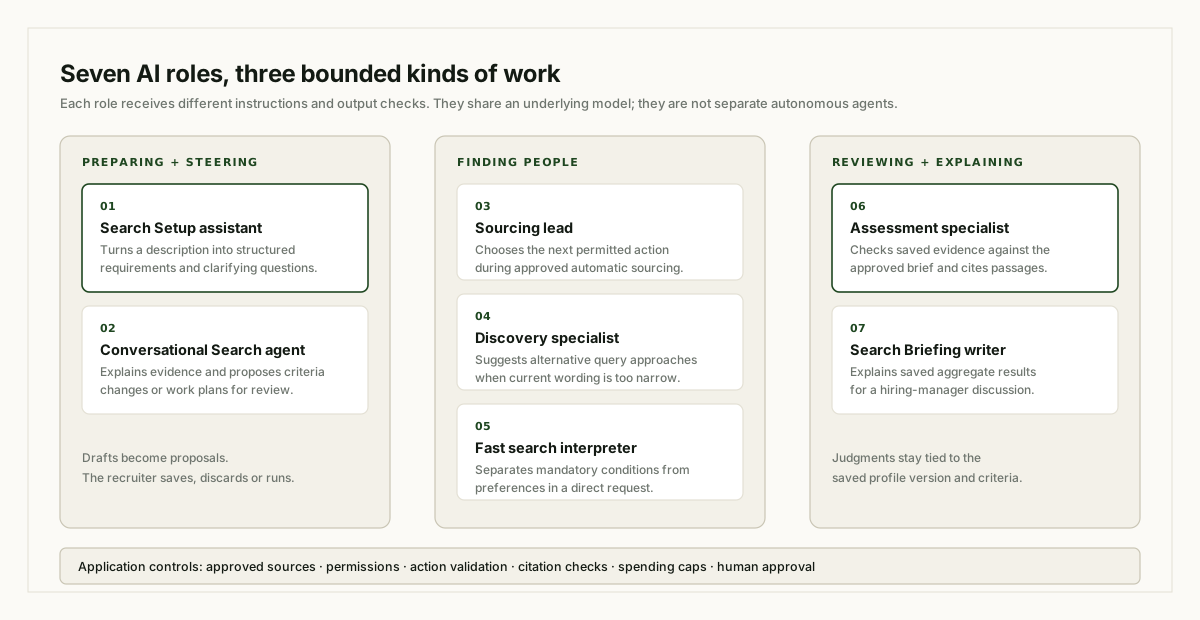
An “agent” in Talent Hub is an AI role with defined instructions, information, and permitted actions. Several roles currently share the same underlying language model. Their responsibilities differ because the application gives each a different task and checks its output differently.
They are invoked when needed during the workflow. The following seven roles include the supporting Fast search interpreter; they do not represent seven separate chat windows or seven models running continuously.
1. The Search Setup assistant turns a description into a usable brief
The Setup assistant helps translate a recruiter’s description into structured requirements, preferences, and discovery hints. It can ask clarifying questions and help the recruiter work through unresolved choices.
For example, “We need someone senior who has built a developer platform” leaves several questions unanswered. Does seniority mean technical depth, organizational leadership, or both? Is platform ownership mandatory? How recent must that experience be?
The assistant’s instructions require it to use the supplied description and avoid inventing mandatory thresholds. The resulting draft is available for human review. Preparing that draft and starting candidate work are separate actions.
2. The conversational Search agent helps the recruiter steer the work
This is the assistant beside the candidate workspace. It answers questions about the Search, explains available evidence, and interprets requests such as “find more people like these” or “remove the company-size restriction.”
Its responses have a structured meaning underneath the conversational wording. A reply might be an answer, a clarification question, a proposed criteria change, or a proposed work plan.
The application validates that meaning before acting on it. In the ongoing Hiring brief workflow, a recognized criteria change becomes an unsaved proposal. The recruiter can inspect its impact and choose Save or Discard.
Candidate work similarly becomes a displayed plan with a scope and spending cap. The recruiter approves that plan through Run or a recognized “go ahead.”
The Hub also retains a bounded, read-only question-answering path for explaining saved evidence and assessments.
3. The sourcing lead chooses useful next steps during automatic sourcing
The sourcing lead helps pursue an approved candidate goal. It can choose a local search, inspect a profile, request discovery help, delegate an assessment, save a source-linked observation, or request a checkpoint.
Its role is useful when the search needs another approach. If one query produces little useful evidence, the lead can respond to those results and try a different permitted action.
Each action comes from a fixed tool list. The application checks the request and performs the operation. Database access, shortlist publication, and spending controls remain application responsibilities.
The lead can propose a change to the rules, but that proposal does not approve itself.
4. The Discovery specialist suggests alternative search approaches
The Discovery specialist helps when the current wording is too narrow or unproductive.
For a developer-platform role, it might suggest looking for related descriptions involving APIs, integrations, or developer tools. It returns focused query suggestions and a rationale, informed by the approved role and earlier attempts.
The application runs the resulting local searches. This specialist works with search hypotheses; individual candidate judgments belong to assessment.
5. The Fast search interpreter translates a direct request into search conditions
Fast search has a separate interpretation capability for natural-language queries.
Suppose a recruiter asks: “Show people in Berlin with solutions-selling experience, preferably from smaller companies.”
The interpreter identifies the relevance query and distinguishes mandatory conditions from preferences. Its instructions require it to preserve details such as time windows, numerical thresholds, and whether the user meant “and” or “or.”
It receives the request and inherited criteria, without candidate profiles. It can ask a clarification question when the request is ambiguous or conflicts with existing requirements.
Conditions that require interpretation remain marked for assessment. A request for demonstrated experience cannot simply become a check for whether a particular word appears.
In the ongoing agent workflow, an approved discovery action can inherit the brief directly, avoiding an additional interpretation step.
6. The Assessment specialist examines a person against the approved brief
The Assessment specialist reads a specific saved version of a candidate’s evidence. It returns an overall fit judgment, findings against the requirements, supporting quotations, gaps, and concerns.
Its instructions emphasize personal responsibilities. A company description can explain the environment, but it cannot establish what the person personally did. Titles and employer reputation also cannot establish responsibility on their own.
The assessment must cite exact passages from the supplied source. The application checks that the quotations exist at the referenced locations and applies the relevant eligibility rules.
The Hub supports both an engineering-specific assessment policy and more general requirement-based policies. The approved role determines which requirements apply.
7. The Search Briefing writer explains the saved results
At an authorized Search completion, the Briefing writer can turn saved aggregate facts into a concise explanation for discussion with a hiring manager, when the remaining allowance permits it.
It can highlight findings about companies, experience, career histories, or evidence gaps. Its facts come from the application’s saved results, and the application checks the references it returns.
The writer is instructed to keep its interpretation cautious. Its job is to explain the Search’s findings, with clear distinctions between people found, people assessed, and people shortlisted. Saved-data summaries remain available when a generated briefing is unavailable.
Ordinary software coordinates the agents’ work
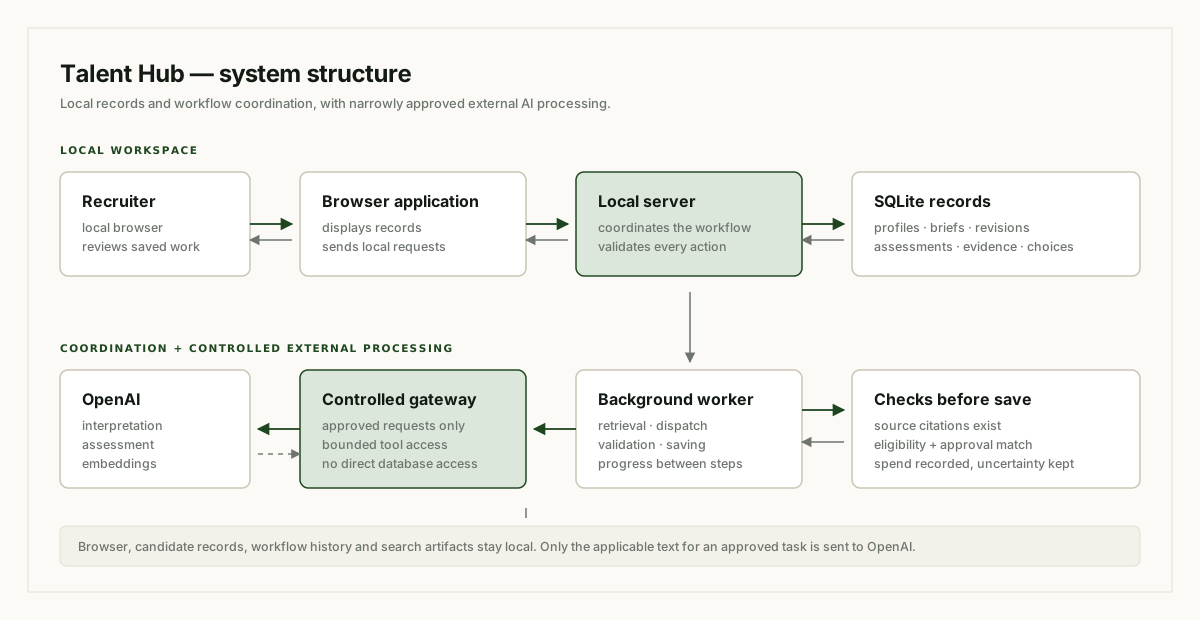
Behind the conversational interface is a browser application, a local server, a SQLite database, and a background worker.
The browser displays saved information and sends requests to the server. The database retains the work. The worker picks up approved tasks and coordinates retrieval, model requests, validation, and saving results.
This arrangement gives the workflow continuity. A long task can record progress between steps, and the interface can show that saved progress.
It also avoids unnecessary model decisions. If eligible candidates are already waiting for assessment, the application can dispatch that work directly. The sourcing lead does not need to choose every routine next step.
The application translates supported filters into controlled database operations. Profile inspection, retrieval, scheduling, citation checking, and shortlist selection are application capabilities, not additional AI personalities.
Evidence checks make the reasoning inspectable
An assessment is tied to the profile version and criteria used at the time. Its evidence references point back to specific parts of that saved source.
If a quotation cannot be matched, the application can reject the assessment and retain the failure for review. A fluent explanation alone cannot turn an invalid citation into an accepted result.
These checks establish traceability. They do not establish that every statement in a profile is true, or that every model interpretation is correct. A recruiter can still examine whether a quoted passage supports the conclusion being drawn.
The Hub also keeps several kinds of uncertainty separate. A candidate may have a positive fit judgment with visible evidence gaps. Whether they qualify automatically for the shortlist depends on the approved policy and eligibility checks. Confirmed failures and invalid or held results receive different treatment from missing detail.
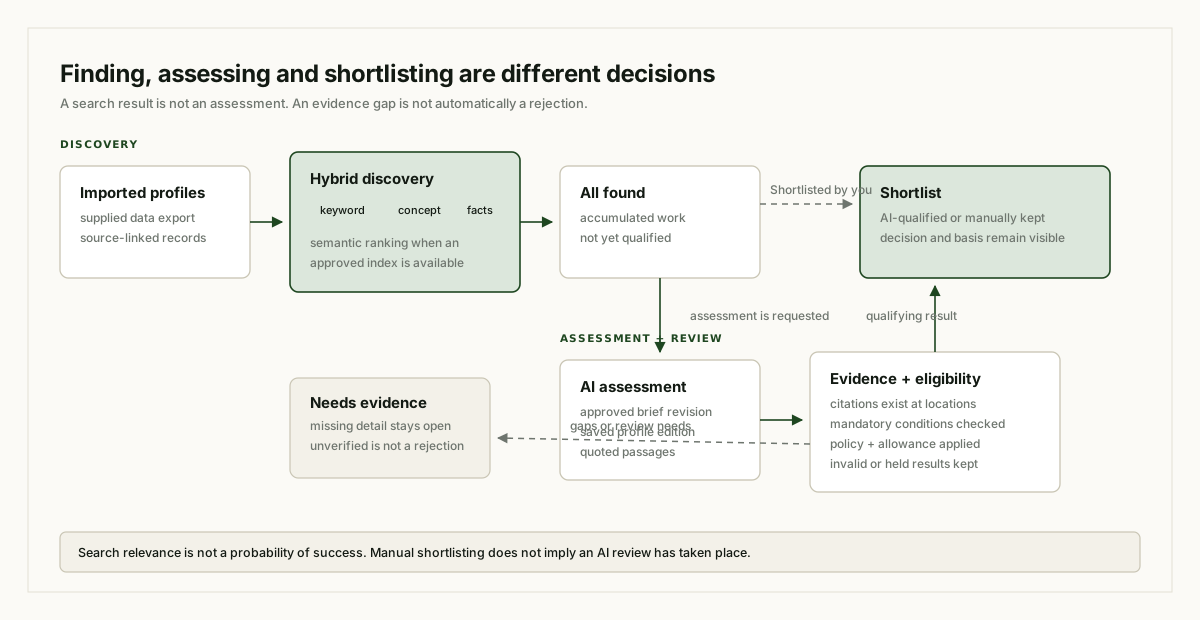
The ongoing workspace presents different views of the accumulated candidate work:
| View | What it shows |
|---|---|
| All found | Candidates accumulated through discovery and review activity. |
| Not assessed | Candidates without a completed assessment in the relevant context. |
| Needs evidence | Non-shortlisted candidates with outstanding evidence or review needs. |
| Shortlist | Candidates retained through qualifying AI results or a recruiter’s manual choice. |
All found contains the accumulated work. Some other views can overlap: a recruiter can manually shortlist someone before requesting an AI assessment, so that person can also remain Not assessed. Needs evidence excludes shortlisted people, although their individual profiles can still show evidence gaps.
That choice is recorded as Shortlisted by you. It preserves the recruiter’s decision without implying that an AI review has taken place.
The brief can evolve while earlier work remains understandable
Hiring criteria often change after a recruiter has seen the available talent. The Hub supports that evolution through saved revisions.
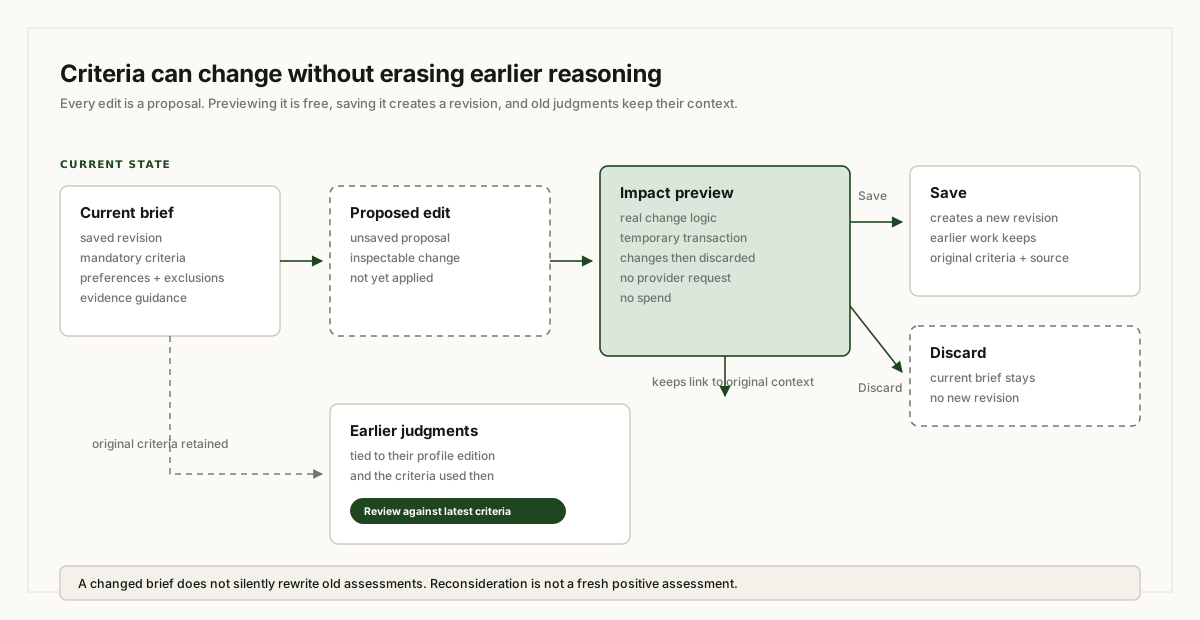
Before a proposed change is saved, an impact preview can show its consequences for the existing work. The preview uses the application’s real change logic inside a temporary database transaction, then discards the temporary changes. It makes no provider request.
Saving creates a new revision. Earlier judgments retain their original criteria and source context. If they no longer cover the current brief, the board can flag them for Review against latest criteria.
Removing an exclusion can also make a previously encountered candidate available for reconsideration. That does not create a fresh positive assessment.
Existing shortlist work is preserved when the recruiter requests additions. “Find another three” seeks fresh qualifying members while retaining the people already kept. The Search can report a shortfall if the available collection or allowance cannot support the requested additions.
Approvals and accounting bound the work
Candidate actions have a displayed scope and spending cap. Approval refers to that particular plan, brief revision, and source context. If those inputs change, the old approval can become invalid.
The application records money as spent, reserved, and available. It checks allowance before dispatch and records actual provider usage afterward. Index preparation has its own Project-level approval and cap, while Search activity uses the relevant Search Allowance.
A failed or unusable model reply can still have incurred a charge. An interrupted request can also leave its outcome uncertain. The Hub retains that uncertainty so it can be reconciled before paid work is repeated.
Pause lets dispatched review reach its saved boundary while holding remaining work. Stop blocks further dispatch for the brief, cancels its queued actions, and prevents late cancelled output from publishing new candidate decisions.
Already submitted remote Batch work has a separate cancellation and accounting lifecycle.
A local workspace with controlled external AI processing
The application, candidate records, workflow history, and search artifacts are kept locally. Approved AI processing sends the applicable text to OpenAI for tasks such as interpretation, assessment, or embeddings.
The Hub’s gateways restrict those automated connections and permitted capabilities. Profile research happens through controlled inspection of the supplied records. LinkedIn links remain available for a recruiter to open manually.
The resulting workspace connects decisions to their basis: the hiring brief, the profile edition, the supporting passage, the assessment, and the recruiter’s choice.
When someone asks why a candidate is on the shortlist, the Hub can provide a record they can inspect.
Editorial note: this article describes the saved implementation reviewed on 21 October 2026. Examples are illustrative. The four diagrams are conceptual illustrations. Source notes record the implementation references and validation limits.
A chat interface over three years of talent acquisition data, built after a PII-redacted MCP prototype showed what was possible. ATS records are ingested through APIs into Snowflake, shaped into semantic views with shared definitions, and exposed through Cortex so TA teams can ask questions in plain language and get consistent, source-backed answers. Built with a team of two in three months, then demoed to Snowflake's CEO.
From a local MCP prototype to a Snowflake Cortex chat agent
From a local MCP prototype to a Snowflake Cortex chat agent
This project started with an idea I had while listening to the business talk about how hard it was to get meaningful data out of our systems. The ATS held the detail, but extracting an answer still depended on reports, exports and whoever knew the right query.
The first version was deliberately small: a heavily PII-redacted report stored in a local PostgreSQL database, with a hand-built MCP server exposing a set of predefined tools. It proved that a conversational layer over TA data was not just possible; it produced answers people had not been able to reach quickly before.
The output was an eye-opener. But it answered only the first question. The harder one was: how does this scale, and scale safely?
That question took the prototype to the business. We asked what already existed in our tech stack that could mirror the approach in a governed environment. Cortex was still in early development at the time, but we picked it up and ran with it — a team of two: myself and an analytics engineer.
Three months later we had something impressive enough to demo to Snowflake’s CEO. The rest of this article is about the work underneath that demo.
The problem was not a lack of data
Talent acquisition teams sit on a large, detailed record of how hiring actually works: every requisition, application, interview, offer, rejection and hire. The information is there, but getting an answer usually means knowing which report to open, which filter to apply, or who can write the query.
Answering those questions repeatedly created a familiar loop: request, export, clean, query, explain, repeat. Each answer could be correct in isolation while using a slightly different definition from the last one. Two reports could disagree without either being obviously wrong.
A chat interface would only be useful if it improved that situation. Putting a language model in front of inconsistent tables would make the inconsistency faster to reach.
Ingestion first: getting three years into one place
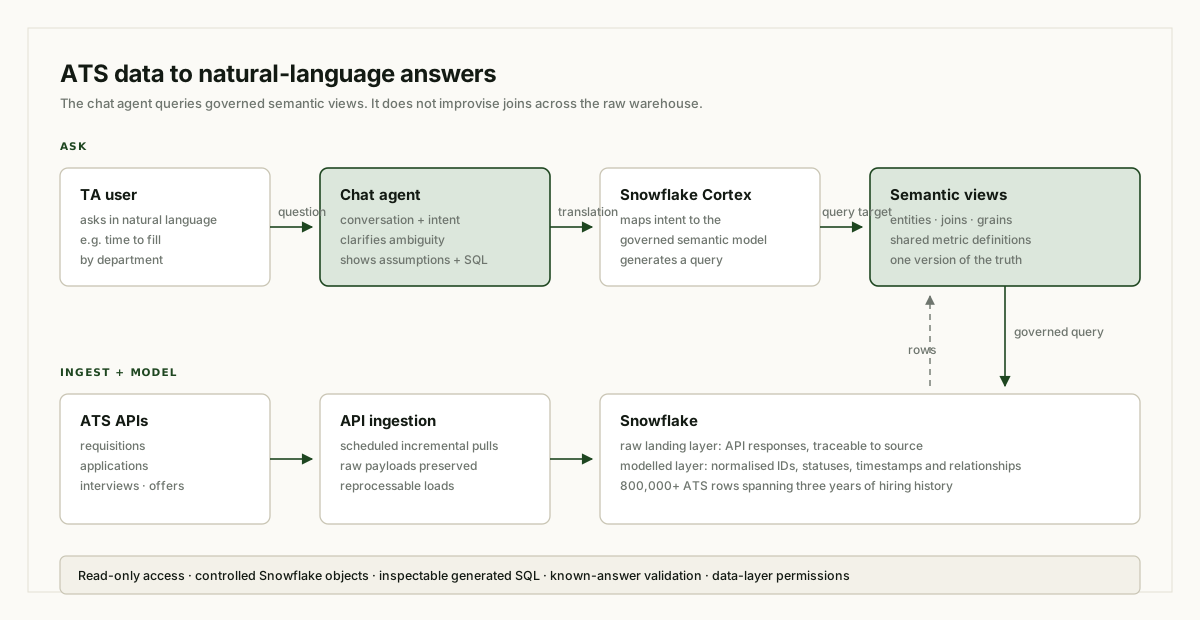
Data arrived through the ATS APIs. The ingestion layer pulled the supported objects, preserved the raw payloads, and loaded them into Snowflake on a repeatable schedule. Incremental updates mattered because hiring data changes constantly: candidates move stage, requisitions are edited, interviews are rescheduled, offers are withdrawn.
Keeping a raw landing layer gave us a reference point. If a modelled metric looked wrong, we could trace it back to the API response that produced it. The raw layer also made reprocessing possible without another full extraction.
Above that sat the modelled layer. IDs were normalised, timestamps aligned, status values mapped, and relationships between requisitions, candidates, applications and interviews made explicit. The goal was not simply to store 800,000 rows. It was to make each row mean the same thing every time it was queried.
Semantic views became the shared language
This was the most important design decision. The chat agent does not freely interpret the entire warehouse. It works against semantic views that define the entities, joins, grains and metrics people actually ask about.
A semantic view gives the agent a controlled vocabulary: what counts as an application, which date marks the start of a requisition, how a stage is classified, which records belong in an active pipeline, how a hire is identified. Those choices are written down once instead of being re-invented in every prompt or report.
That matters for natural language. “How many hires did we make?” sounds unambiguous until someone asks whether it means accepted offers, start dates, internal moves, or requisitions closed. The semantic layer forces those distinctions into the open and gives the agent a stable target to query.
The views also act as a contract. When definitions change, they change in one place. The chat agent, dashboards and ad hoc analysis can then share the same version of the truth rather than drifting apart.
How the chat agent answers a question
A user asks a question in the chat interface. Cortex interprets the intent, maps it to the available semantic views, and generates a query against that governed layer. The result is returned with a written answer, and the generated SQL remains inspectable so the user can see how the conclusion was reached.
For a question like “show me time to fill by department for the last three quarters,” the agent has to resolve several things: which date field defines the clock, which requisitions qualify, how departments are grouped, and what “last three quarters” means relative to the current date. The semantic layer supplies the definitions; the agent supplies the conversational translation.
The interface is deliberately read-only. It can query governed data, but it cannot modify ATS records, change definitions, or reach outside the approved Snowflake objects. Access controls remain at the data layer rather than being left to the prompt.
Trust was built through validation, not demo polish
The first version of any text-to-SQL system looks impressive in a demo. The real test is whether it returns the same answer as a trusted report when the question is precise, and whether it asks for clarification when the question is not.
We validated the agent against known questions with known answers. Where it disagreed with a trusted source, the failure usually belonged to one of three places: an ambiguous question, a missing semantic definition, or a data quality issue in the underlying records. Each failure improved the model layer rather than being patched with a longer prompt.
That loop changed how we thought about the project. The chat agent was not a separate product sitting on top of the warehouse. It was an interface that exposed the quality of the semantic model underneath it.
What the agent should not pretend to know
Some questions have a precise answer in the data. Others require context that the ATS does not contain. A good chat agent should distinguish between the two.
When a term is undefined, the semantic layer may have no honest way to resolve it. The agent should ask a clarifying question or state its assumption rather than inventing a definition. When a record is incomplete, the answer should show the gap. When a query fails, the failure should be visible instead of being smoothed into a confident paragraph.
The same principle applies to the generated SQL. It is not there to make every user read code. It is there so an analyst can audit an answer when the stakes justify it. Transparency is what separates a useful analytical interface from a fluent guess.
What changed for the team
The practical shift was access. Questions that previously required a report request or a SQL writer could start in a chat window and return an answer grounded in the same semantic definitions as the official reporting layer.
The second shift was diagnostic. Because the chat agent exercised the semantic views continuously, it surfaced ambiguity and data quality problems that had been easy to avoid in fixed dashboards. A dashboard only answers the questions it was designed for. A chat interface asks the semantic model to explain itself.
That did not make dashboards obsolete. Curated views remain better for monitoring a known metric, comparing trends, or sharing a stable narrative. The chat agent is better for exploration, follow-up questions, and the long tail of requests that never justified a dedicated report.
Three months, two people, one demo
The demo to Snowflake’s CEO was a milestone, not the finish line. It showed what a small team could build when the problem was narrow, the data model was explicit and the platform gave us a way to query it safely.
With two people, the work had to stay focused. The analytics engineer owned much of the modelling and ingestion reality; I drove the product question, the semantic layer, the chat behaviour and the validation loop. There was no room for a large platform team, so every decision had to earn its place.
That constraint was useful. It kept the project close to the questions the business actually needed answered, rather than turning into a general-purpose data platform.
Lessons from the build
The prototype proved the value. The production path proved the harder point: a conversational interface is only as trustworthy as the definitions, access controls and validation underneath it. The semantic layer is the product; the chat window is how people reach it.
Ingestion quality is visible in every answer. Duplicate records, stale statuses and timezone differences do not stay hidden when someone can ask any question they like.
Natural language is not a replacement for precision. It is a more accessible way to reach precision, provided the system is willing to clarify, qualify and show its work.
The result is a chat layer over more than 800,000 rows and three years of TA history — not because the model can read everything, but because the data underneath it was given a structure the model can reliably query.
Editorial note: this article describes the architecture and design decisions behind the project. Examples are illustrative, and the diagram is conceptual. Any figures refer to the imported ATS dataset rather than measured business outcomes.
A copilot that reads the req, drafts the search, enriches profiles and writes the first outreach — then hands a ranked shortlist to a human. The evals are the hard part, and the fun part.